
Translation extension for Chrome, Edge and Firefox with AI translation, AI chat, text-to-speech and a dictionary
Translate text with the DeepL API, use cloud AI models and natural text-to-speech through OpenRouter, or run local models with Ollama. AI chat, translation history, a dictionary and export to Anki and Quizlet are available in the side panel.
Works on your browser
Install VoxyFlow from Chrome Web Store in Chrome and compatible browsers, from Microsoft Edge Add-ons in Edge, or from Firefox Add-ons in Firefox. Safari support is coming later.
Stay in the flow. Turn reading into learning.
Translation Options
Hover to translate quickly, select phrases for deep analysis, or use the context menu. VoxyFlow adapts to your workflow.
Translation Flexibility
Use DeepL for fast, high-quality translation or experiment with LLMs via Ollama or OpenRouter.
Smart Dictionary
Words can have multiple meanings. VoxyFlow lets you save not just words, but entire phrases to capture the right context.
Data Export
Save words and phrases to your dictionary, then export them to a CSV file for study in Anki or Quizlet.
Listen. Remember. Repeat.
Hear original and translated pronunciations right in the extension. Control playback speed to catch every detail.
PDF Translation
VoxyFlow supports translation in text-based PDF documents just like on websites. It works via the context menu without hotkeys, and Flow can be opened with a button.
Three ways to translate — pick what fits the moment
Hover Translation
Hold the hotkey and hover. Translation appears in ≤150 ms right next to the word. Release the key — you're back to reading. Zero clicks.
Selection Translation
Select any phrase or paragraph. Get a full translation, listen to pronunciation, and save to your Flow dictionary — all from one popover.
Flow Translation
Paste text directly into Flow for a thorough review. Great for articles, documents, or anything worth studying closely.
Right Click
Select text, right-click, and choose 'Translate with VoxyFlow'. Also works in text-based PDFs.
Full keyboard control
Every VoxyFlow action is reachable from the keyboard. One main shortcut activates hover and selection mode — then F, C, G, and Space handle the rest.
Main Shortcut
Activates hover translation when held, or translates selected text when pressed.
Inside the Translation Popover
Additional Shortcuts
Flow — your reading turns into a word bank
Every word you save goes into Flow with the original sentence. Review in the sidebar without closing your article. Export to Anki when you're ready to drill.
- Flow: a feed of all your translations. Opens on the side without covering the article text.
- Live dictionary: save words along with their context sentence, edit them, and add notes.
- Export: extract your saved dictionary for spaced repetition with a single click (details below).
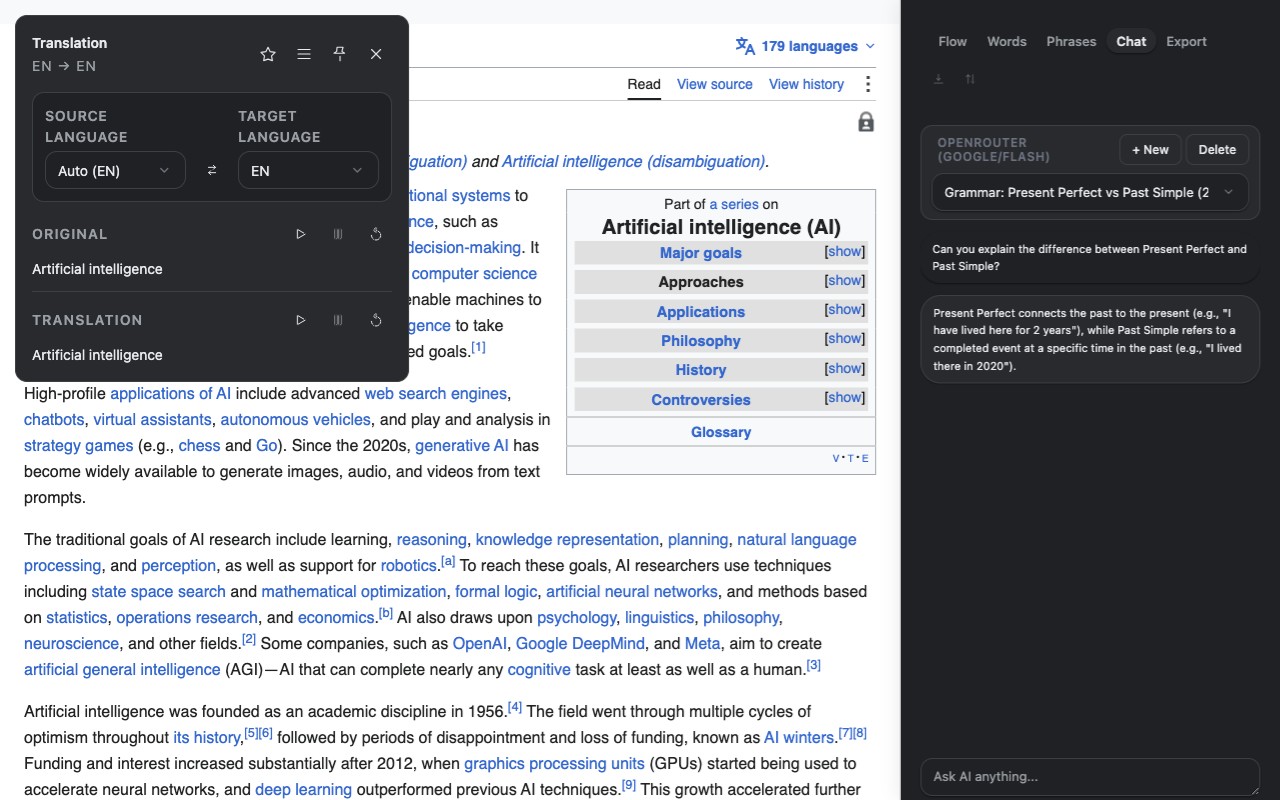
AI chat in the side panel
Ask about grammar, analyse selected text and keep separate conversations with AI in the side panel.
From reading to Anki — in one click
Export your saved words as a CSV compatible with Anki and Quizlet. Every card includes the original sentence — so you study words the way you actually encountered them.
- Ready-to-import CSV: Click Export in the Flow panel — the file works in Anki, Quizlet, and any flashcard app that accepts CSV.
- Context sentences included: Each word is exported with the sentence where you first saw it. Context is what makes words stick.
- Spaced repetition effect: Anki shows each card right before you'd forget it. Studies show this makes memorization 2–5x more effective than review lists.




























Choose your AI translator
VoxyFlow gives you the freedom to choose the best translation engine for your needs. Use DeepL for lighting-fast context translation, OpenRouter for advanced LLMs, or Ollama for full privacy.
DeepL
Lightning fast neural translation. The default choice. Accurate, context-aware, and free for up to 500k characters.
- ≤150ms response
- 100+ languages
- API key required
OpenRouter (LLMs)
Access the smartest AI models like Gemini 2.5 Flash, Claude 3.5, or DeepSeek. For times when standard translation isn't enough.
- Advanced models
- Configurable limits
- Pay per token
Ollama (Local LLM)
Run open-source translation models locally on your own machine. Zero data leaves your computer.
- 100% private
- Free offline
- translategemma & more
Built for those who value quality and privacy
Instant repeat translation.
VoxyFlow caches translations, so repeat requests return in milliseconds and don't consume your DeepL or LLM limits.
Your data never leaves your browser
Only the text you select is sent to DeepL for translation. No URLs, no browsing history, no metadata — ever.
One-click settings.
Click the extension icon in the toolbar. Change translation languages, speech rate, and hotkeys in seconds.
Your key, your rules
Use your personal DeepL or OpenRouter API key. Pay only for what you actually translate, directly to the provider.
API Block/Ban Protection
A built-in circuit breaker temporarily pauses requests during server errors, protecting your account from spam-request bans.
Zero Browser Overhead
VoxyFlow doesn't inject heavy scripts. The interface appears as an overlay in milliseconds only when you invoke it.
Common questions
Is VoxyFlow free?
Yes, the extension is free. You need a DeepL API Free key — it gives 500,000 characters per month at no cost and takes about 2 minutes to set up.
Do I need a VPN to use it?
No VPN is needed to use VoxyFlow. You may need one once to create your DeepL account depending on your region.
How do I export words to Anki?
Open the Flow sidebar and click 'Export'. You'll get a CSV file ready to import into Anki, Quizlet, or any flashcard app.
Which browsers are supported?
Chrome, Edge, Arc, Brave, Yandex Browser, and Firefox. Install the Firefox extension from Firefox Add-ons. Safari support is coming later.
Is my browsing data shared?
No. Only the text you select is sent to DeepL. Your URLs, history, and browsing activity are never transmitted.